Published - 8 years ago ( Updated - 8 years ago )
About TTFB:
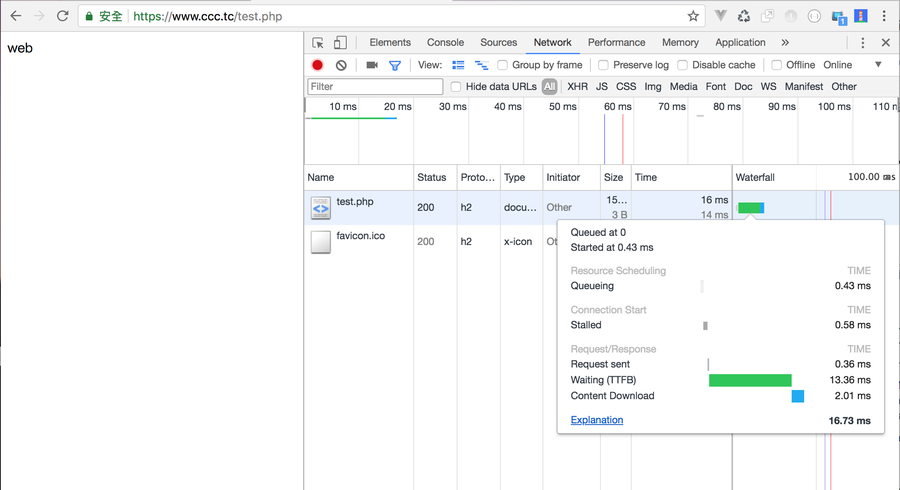
TTFB(Time To First Byte): The browser is waiting for the first byte of the response. TTFB stands for time to first byte.
This time includes 1 round trip delay and the time for the server to prepare a response.
This time includes 1 round trip delay and the time for the server to prepare a response.
Key points:
Okay, maybe everyone will wonder that the TTFB time of your host is very long, which means that the host may perform some calculations before the screen can be displayed.
For example, a large number of database queries, or the network is too slow, and other factors, but how to judge?
We can compare whether the HTML static page is very different from the simple PHP dynamic page, and perhaps find out the problem of slow TTFB response.
For example, if the TTFB is 16ms on a static page but when it comes to a dynamic page in PHP, it runs 3xxms without any calculation.
Such a problem may be in the setting of PHP.
You can see if any plug-in is affected, such as Xdebug plug-in with PHP enabled,
At this time, the TTFB will not be 13.36ms below, but may become 2xxms.
So if it is the Porduction version, and Xdeubg is used in php.ini, remember to disable the Xdebug function.
For example, a large number of database queries, or the network is too slow, and other factors, but how to judge?
We can compare whether the HTML static page is very different from the simple PHP dynamic page, and perhaps find out the problem of slow TTFB response.
For example, if the TTFB is 16ms on a static page but when it comes to a dynamic page in PHP, it runs 3xxms without any calculation.
Such a problem may be in the setting of PHP.
You can see if any plug-in is affected, such as Xdebug plug-in with PHP enabled,
At this time, the TTFB will not be 13.36ms below, but may become 2xxms.
So if it is the Porduction version, and Xdeubg is used in php.ini, remember to disable the Xdebug function.



No Comment
Post your comment